【VBA】Excelマクロを利用して作業効率を上げたい⑤
 msg15
msg15はじめに
久々の投稿になります。
VBAシリーズも増えてきました。
今日もいくつかマクロを作成してみました。
①枠線の色を統一する
枠線の色を統一するためのマクロです。
★を付与しているRGBの値を変更することで、統一したい色を設定できます。
Sub 枠線の色を統一()
    On Error GoTo e
    Call 描画を止める
    Dim rng As Range
    Dim cell As Range
    Dim border As border
    Dim borderColor As Long

    ' ★
    ' RGB(163, 163, 163) を Long 型に変換
    borderColor = RGB(163, 163, 163)

    ' 選択範囲を取得
    Set rng = Selection

    ' 各セルの枠線に色を設定
    For Each cell In rng.Cells
        For Each border In cell.Borders
            If border.LineStyle <> xlNone Then
                border.Color = borderColor
            End If
        Next border
    Next cell

    MsgBox "枠線の色を A3A3A3 に統一しました。", vbInformation
e:
    Call 描画する
End Sub

Sub 描画を止める()
    Application.ScreenUpdating = False
End Sub
Sub 描画する()
    Application.ScreenUpdating = True
End Sub②枠線のスタイルを統一する
枠線にも、破線や太線など様々なものがあります。
ここでは1つ目に選択したシェイプまたは、セルの枠線に合わせ枠線を統一するマクロを書いてみました。
Sub 枠線のスタイルを統一()
    Call 描画を止める
    Dim rng As Range
    Dim cell As Range
    Dim border As border
    Dim shprng As Object
    Dim shp As Shape
    Dim baseCell As Range
    Dim borderIndex As Variant


    ' 選択範囲を取得
    On Error Resume Next
    Set rng = Selection
    On Error GoTo 0

    ' 各セルの枠線に色を設定
    If Not rng Is Nothing Then
       ' 基準セル(最初のセル)を取得
        Set baseCell = rng.Cells(1)

        ' 結合セルなら結合範囲全体を取得
        If baseCell.MergeCells Then
            Set baseArea = baseCell.MergeArea
        Else
            Set baseArea = baseCell
        End If

        ' 他のセルに枠線スタイルをコピー
        For Each cell In rng.Cells
            ' 基準セル自身はスキップ
            If Intersect(cell, baseArea) Is Nothing Then
                ' コピー先が結合セルなら、結合範囲全体に適用
                If cell.MergeCells Then
                    Set cell = cell.MergeArea
                End If

                For Each borderIndex In Array(xlEdgeLeft, xlEdgeTop, xlEdgeBottom, xlEdgeRight, xlInsideHorizontal, xlInsideVertical)
                    With cell.Borders(borderIndex)
                        .LineStyle = baseArea.Borders(borderIndex).LineStyle
                        .Weight = baseArea.Borders(borderIndex).Weight
                        .Color = baseArea.Borders(borderIndex).Color
                    End With
                Next borderIndex
            End If
        Next cell
    End If

    ' セルでなければシェイプ範囲として取得を試みる
    On Error Resume Next
    Set shpRange = ActiveWindow.Selection.ShapeRange
    On Error GoTo e


    If Not shpRange Is Nothing Then
        If shpRange.Count < 2 Then
            shpRange(1).Line.Visible = Not shpRange(1).Line.Visible
        Else
            ' 2番目以降のシェイプに適用
            For i = 2 To shpRange.Count
                With shpRange(i).Line
                    .ForeColor.RGB = shpRange(1).Line.ForeColor.RGB
                    .Weight = shpRange(1).Line.Weight
                    .DashStyle = shpRange(1).Line.DashStyle
                    .Style = shpRange(1).Line.Style
                    .Transparency = shpRange(1).Line.Transparency
                    .Visible = shpRange(1).Line.Visible
                End With
            Next i
        End If
    End If

    MsgBox "枠線のスタイルを統一しました。", vbInformation
e:
    Call 描画する
End Sub

' 下記は必要あれば。
Sub 描画を止める()
    Application.ScreenUpdating = False
End Sub
Sub 描画する()
    Application.ScreenUpdating = True
End Sub③キーを押下するたびにセル内の文字の揃え方をきりかえる
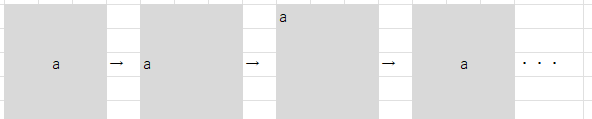
続いて、キーを押下するたびにセル内の文字を中央揃え→左揃え→上揃え→中央揃えといったように切り替えます
Sub Toggleセルをセンタリング()
    Dim rng As Range
    Set rng = Selection

    If rng.VerticalAlignment = xlCenter Then
        If rng.HorizontalAlignment = xlLeft Then
            rng.VerticalAlignment = xlTop
        ElseIf rng.HorizontalAlignment = xlCenter Then
            rng.HorizontalAlignment = xlLeft
        End If
    Else
        With rng
            .HorizontalAlignment = xlCenter
            .VerticalAlignment = xlCenter
        End With
    End If
End Sub④枠線に合わせセルを結合
セルを結合する場面はたくさんあると思います。メリットもデメリットもある機能ですよね。
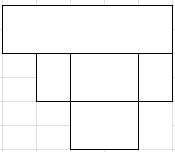
ここでは、枠線に合わせセルを結合するマクロを作りました。選択範囲に応じて実行範囲が変わります。
四角を検知して結合している仕組みです。単純なパターンのみ対応可能です。
実行前

実行後
Sub 枠線で囲まれたセルを結合()

    On Error GoTo e
    Dim rg As Range, cl As Range
    Dim usrres As VbMsgBoxResult
    Dim ws As Worksheet
    Dim r As Long, c As Long
    Dim cc As Object
    Dim sr As Long, sc As Long
    Dim er As Long, ec As Long
    Dim ms As Boolean
    Dim frst As Boolean

    usrres = MsgBox("選択範囲内の枠線で囲まれたセルを結合します。よろしいですか?", vbOKCancel + vbQuestion, "セル結合の確認")
    If usrres = vbCancel Then
        MsgBox "処理はキャンセルされました。", vbInformation
        GoTo e
    End If

    Set rg = Selection
    Set ws = rg.Worksheet
    Set cc = CreateObject("scripting.dictionary")
    frst = False

    For r = rg.Row To rg.Row + rg.Rows.Count - 1
        For c = rg.Column To rg.Column + rg.Columns.Count - 1
            Dim k As String
            k = r & ":" & c

            If Not cc.exists(k) Then
                Set cl = ws.Cells(r, c)

                With cl.Borders
                    If .Item(xlEdgeTop).LineStyle <> xlNone And _
                        .Item(xlEdgeLeft).LineStyle <> xlNone Then

                        sr = r
                        sc = c
                        er = r
                        ec = c

                        Do While ws.Cells(r, ec).Borders(xlEdgeRight).LineStyle = xlNone And _
                            ec < rg.Columns(rg.Columns.Count).Column
                            ec = ec + 1
                        Loop

                        Do While ws.Cells(er, c).Borders(xlEdgeBottom).LineStyle = xlNone And _
                            er < rg.Rows(rg.Rows.Count).Row
                            er = er + 1
                        Loop

                        Dim mr As Range
                        Set mr = ws.Range(ws.Cells(sr, sc), ws.Cells(er, ec))

                        If frst = False Then
                            ms = Not mr.MergeCells
                            frst = True
                        End If

                        mr.MergeCells = ms

                        Dim ser As Long, sec As Long
                        For ser = sr To er
                            For sec = sc To ec
                                cc.Add ser & ":" & sec, True
                            Next sec
                        Next ser

                    End If
                End With
            End If
        Next c
    Next r

    MsgBox "枠線で囲ませたセルの結合/結合解除が完了しました", vbInformation

e:
End Sub
⑤④とは逆に結合を解除する
④の逆です。選択範囲内の結合済みのセルを結合解除します。
Sub 枠線で囲まれた矩形領域を個別に結合解除()

    On Error GoTo e
    Dim rng As Range, cell As Range
    Dim ws As Worksheet
    Dim r As Long, c As Long
    Dim startRow As Long, startCol As Long
    Dim endRow As Long, endCol As Long
    Dim checkedCells As Object
    Dim userResponse As VbMsgBoxResult

    Set rng = Selection
    Set ws = rng.Worksheet
    Set checkedCells = CreateObject("Scripting.Dictionary")

    ' 確認メッセージ
    userResponse = MsgBox("枠線で囲まれた矩形領域の結合を解除します。よろしいですか?", vbOKCancel + vbQuestion, "結合解除の確認")
    If userResponse = vbCancel Then
        MsgBox "処理はキャンセルされました。", vbInformation
        Exit Sub
    End If

    ' 範囲内のセルを走査
    For r = rng.Row To rng.Row + rng.Rows.Count - 1
        For c = rng.Column To rng.Column + rng.Columns.Count - 1
            Dim key As String
            key = r & ":" & c

            If Not checkedCells.exists(key) Then
                Set cell = ws.Cells(r, c)

                With cell.Borders
                    If .Item(xlEdgeTop).LineStyle <> xlNone And _
                       .Item(xlEdgeLeft).LineStyle <> xlNone Then

                        ' 矩形の右端と下端を探索
                        startRow = r
                        startCol = c
                        endRow = r
                        endCol = c

                        ' 横方向に右端を探す
                        Do While ws.Cells(r, endCol).Borders(xlEdgeRight).LineStyle = xlNone And endCol < rng.Columns(rng.Columns.Count).Column
                            endCol = endCol + 1
                        Loop

                        ' 縦方向に下端を探す
                        Do While ws.Cells(endRow, c).Borders(xlEdgeBottom).LineStyle = xlNone And endRow < rng.Rows(rng.Rows.Count).Row
                            endRow = endRow + 1
                        Loop

                        ' 結合解除範囲を設定
                        Dim mergeRange As Range
                        Set mergeRange = ws.Range(ws.Cells(startRow, startCol), ws.Cells(endRow, endCol))

                        ' 結合されている場合のみ解除
                        If mergeRange.MergeCells Then
                            mergeRange.UnMerge
                        End If

                        ' 処理済みセルを記録
                        Dim rr As Long, cc As Long
                        For rr = startRow To endRow
                            For cc = startCol To endCol
                                checkedCells.Add rr & ":" & cc, True
                            Next cc
                        Next rr
                    End If
                End With
            End If
        Next c
    Next r

    MsgBox "枠線で囲まれた矩形領域の結合解除が完了しました。", vbInformation
e:
End Sub